← All projects36 / BUSINESS SYSTEMS
NMAC CRM
A patient outreach and relationship management platform for NMAC, bringing patient assignments, communication history, call outcomes, appointments, and follow-up tasks into one shared workflow.
Explore the screens ↓About these previewsThe Sales Command Center open in Firefox provided the reference for these previews. Screenshots show the current CRM’s reporting components rendered locally with fictional figures in a compact preview shell. No live patient information, staff records, or internal business metrics are shown.
Inside the project
THE WORKFLOWA connected outreach workflow
The platform connects the work that happens before and after a patient conversation. Teams can organize patient records, assign an agent, record outreach, and link the next action to a task or appointment. Managers review team activity while agents work through their assigned patients.
- 01
OrganizePatient records
- 02
AssignAgent ownership
- 03
ConnectCalls and messages
- 04
Follow throughTasks and appointments
People & responsibilities
0101Patient and agent management
Patient lists support imports and filters for priority, assignment, and agent. Administrators can manage users, assign agents to managers, and review patient counts per agent. These views give teams a practical way to organize outreach responsibilities and find the records that need attention.
02Role-based workspaces
Administrators manage patients, users, templates, and analytics. Managers have dedicated views for patient oversight, team tasks, call logs, messages, and reports. Agents use a focused workspace for their own patient list, patient details, tasks, calls, and conversations.
Conversations & consistency
0203Communication workspace
Email and WhatsApp message history can be searched and filtered by platform. Staff can select a patient, compose a message, or start from a reusable template. Email delivery supports Microsoft Graph, with an SMTP fallback depending on the deployment configuration.
04Reusable message templates
Template management supports creating, editing, and deleting reusable messages. Type and status filters help staff find the appropriate template, while CSV export preserves the current filters. Patient selection connects template-based messaging to the outreach workflow.
From conversation to next action
0305Call outcomes and recall history
Call records capture the contact method, duration, outcome, patient response, interest level, concerns, and notes. Teams can filter the history by patient, outcome, interest, or channel, and review the appointment associated with a conversation when one exists.
06Tasks and next actions
Follow-up tasks connect a patient with an assigned team member, a description, a priority, a status, and a due date. Search and filters help teams organize pending work; agent views focus on their assigned tasks. This keeps the next action attached to the person responsible for it.
07Appointments and booking records
Appointment records connect a patient and agent with a date, optional time, notes, and status. Patient and agent filters support reviewing bookings, while completed and missed indicators provide context for subsequent follow-up.
09 / APP FEATURESOperational follow-up
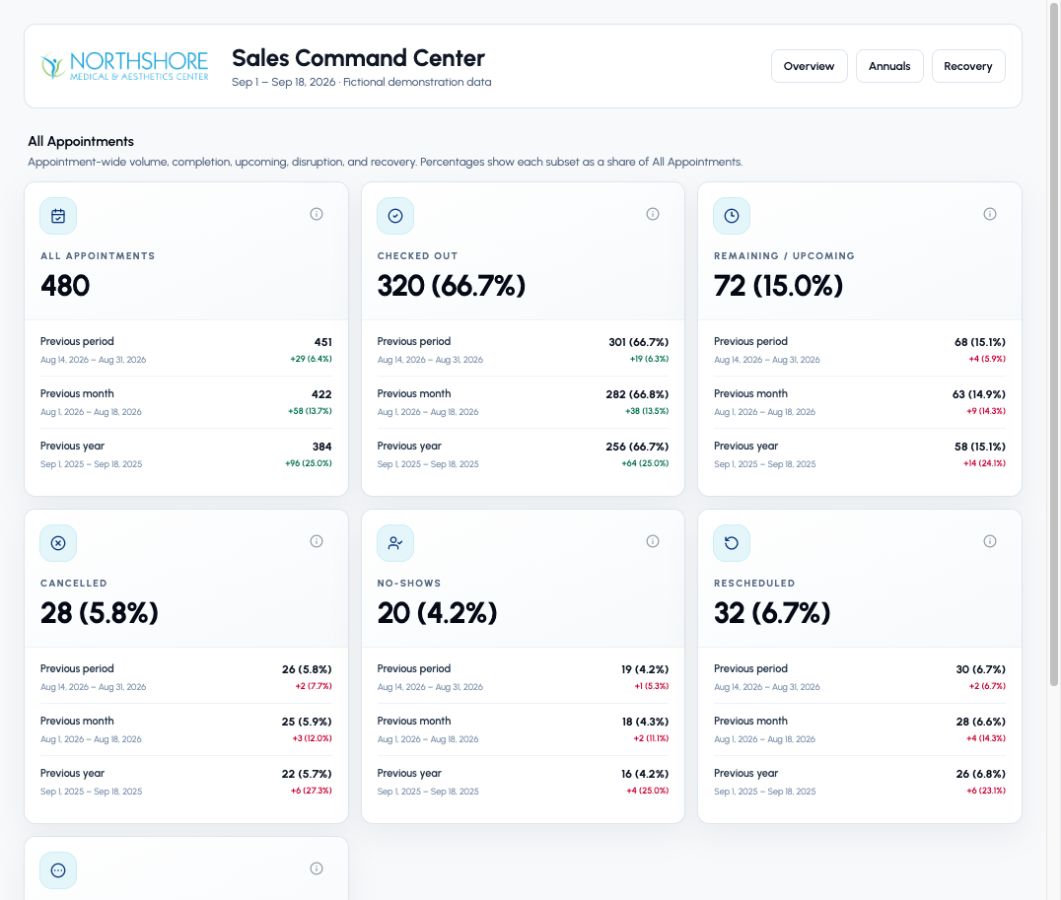
Reporting brings appointment activity and period comparisons into a view that supports operational review. Alongside manager reports and analytics, it gives the team a way to examine outreach and booking activity. The preview uses fictional figures to demonstrate the reporting interface.
View full screen ↗ 10 / APP FEATURESAnnual program reporting
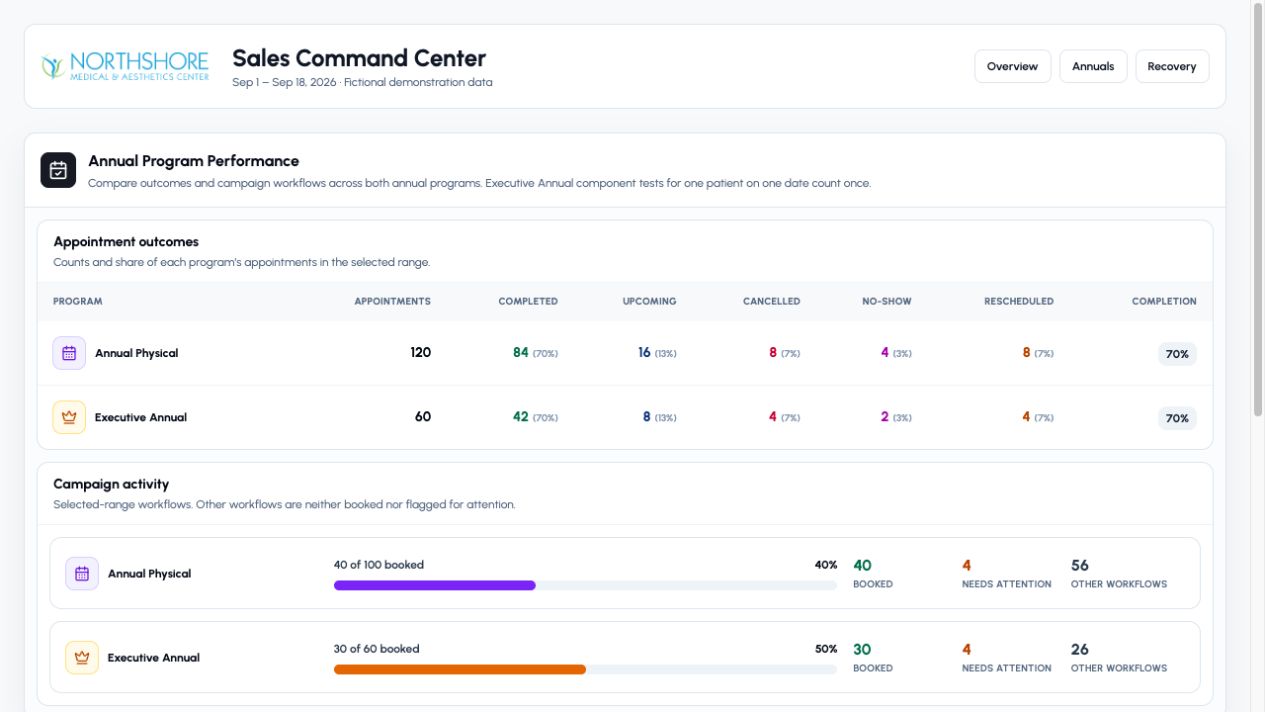
Compares Annual Physical and Executive Annual appointment outcomes, including completion, upcoming bookings, cancellations, no-shows, and reschedules. Campaign progress distinguishes booked workflows, items needing attention, and other work in progress.
View full screen ↗ 11 / APP FEATURESAppointment recovery
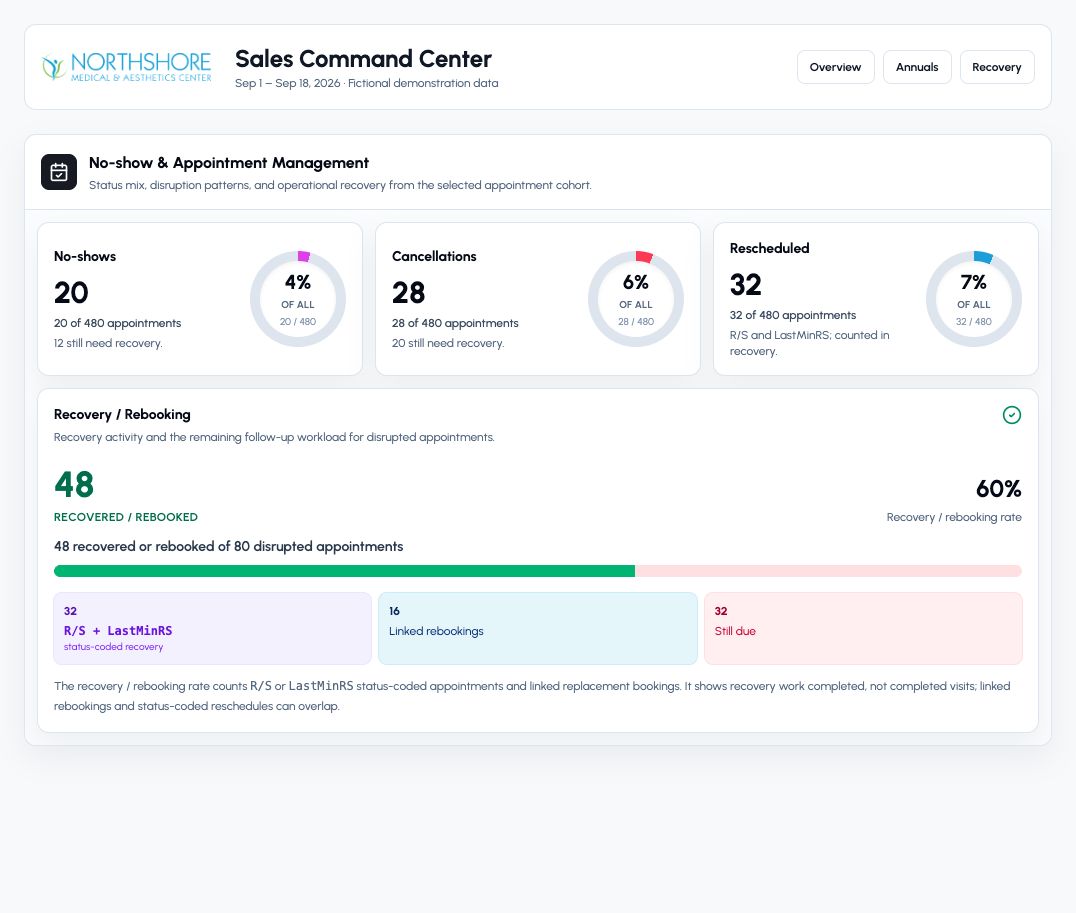
Shows disrupted appointments alongside recovery and rebooking activity. Separate counts for status-coded reschedules, linked rebookings, and work still due help explain the follow-up workload. Recovery is shown separately from completed visits.
View full screen ↗ Application architecture
The current application uses a Next.js shell with a React and TypeScript interface and React Router navigation. Reporting components present appointment, campaign, and recovery data from application APIs, with PostgreSQL persistence and Microsoft Graph communication integration.